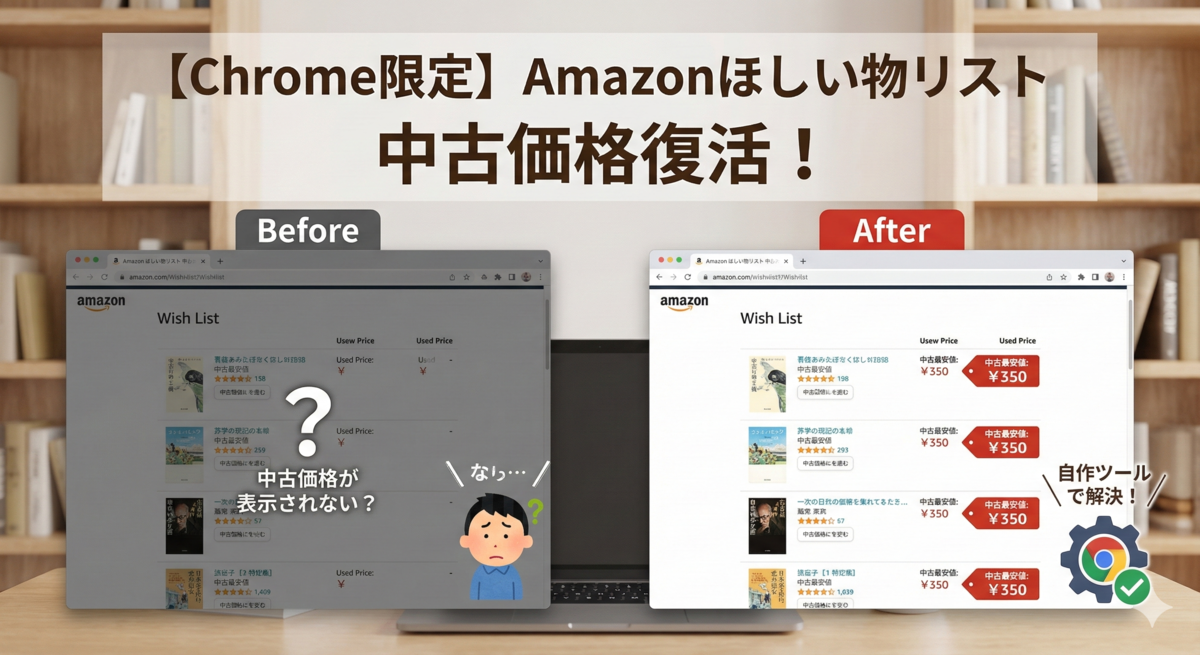
毎月文庫本を中心に5冊ほど読んでいます。 読書は楽しいですが、すべて新品で揃えると毎月の出費もなかなかのもの。そのため、私はもっぱら「中古本」を活用してコストを抑えています。
これまでは、気になる本をAmazonの「ほしい物リスト」に入れておき、中古価格が下がったタイミングで購入する……という節約術を使っていました。 しかし、数年前からリスト一覧に「中古品の最安値」が表示されなくなってしまった気がしませんか?
ネットで解決策を探しても見当たらず、いちいち商品ページを開くのも面倒……。 そこで、「無いなら作ろう」と思い立ち、自力で解決策を開発しました。
Chromeブラウザ限定にはなりますが、今回はその方法をご紹介します。
Chromeの拡張機能の審査を通過したので、以下の説明を読まなくても、このChrome ウェブストアのリンクからワンクリックで拡張機能として機能の追加が出来るようになりました。
【解決策】「Tampermonkey」+「自作スクリプト」で自動化する
今回導入するのは、Chromeの拡張機能『Tampermonkey』です。 これは、本来Webサイトにはない機能を、ユーザーがプログラム(スクリプト)を書いて追加できるという便利なツールです。
導入前の注意点
- ゆっくり読み込みます: 一気に価格情報を取得すると、Amazonから「ロボット(BOT)による不正アクセス」と疑われてブロックされてしまいます。それを防ぐため、あえて数秒に1冊ずつ、ゆっくり価格を取得する仕様にしています。
- 突然使えなくなるかも:Amazonのデザインや仕組みが変わると、このスクリプトは動かなくなります(その時はまた修正版を作ります!)。
手順1:拡張機能「Tampermonkey」を入れる
まずは、スクリプトを動かすための土台となる拡張機能をインストールします。
- Chromeウェブストアで『Tampermonkey』を検索(またはこちらのリンクから)。
- 「Chromeに追加」をクリックしてインストールします。
手順2:スクリプトを登録する
次に、私が作成した「中古価格表示スクリプト」を登録します。
- Chrome右上のTampermonkeyアイコン(黒い四角に目のマーク)をクリック。
- 「新規スクリプトを追加」を選択します。
- エディタ画面が開くので、元々書かれている文字をすべて消して、以下のコードをまるごとコピペしてください。
// ==UserScript==
// @name         Amazon Wishlist Used Price Fetcher v14 (Text Analysis)
// @namespace    http://tampermonkey.net/
// @version      14.0
// @description  中古価格取得(一覧がない場合、ページ内の「中古」という文字の近くにある価格を探し出す版)
// @author       Gemini
// @match        https://www.amazon.co.jp/hz/wishlist/*
// @connect      amazon.co.jp
// @grant        GM_xmlhttpRequest
// ==/UserScript==

(function() {
    'use strict';

    // === 設定 ===
    const DELAY_MS = 2000;
    // ============

    let queue = [];
    let isProcessing = false;

    function processQueue() {
        if (queue.length === 0) {
            isProcessing = false;
            return;
        }

        isProcessing = true;
        const task = queue.shift();

        fetchUsedPrice(task.asin, task.element, () => {
            setTimeout(processQueue, DELAY_MS);
        });
    }

    function fetchUsedPrice(asin, btnContainer, callback) {
        // データ取得用のURL
        const url = `https://www.amazon.co.jp/gp/offer-listing/${asin}/ref=olp_f_used?f_used=true`;
        const linkTag = btnContainer.querySelector('a');

        GM_xmlhttpRequest({
            method: "GET",
            url: url,
            onload: function(response) {
                // CAPTCHA(ロボット対策)画面かどうかの判定
                if (response.responseText.includes("images-na.ssl-images-amazon.com/captcha")) {
                    linkTag.innerText = "認証必要(クリック)";
                    linkTag.style.background = "#ffcccc";
                    if (callback) callback();
                    return;
                }

                const parser = new DOMParser();
                const doc = parser.parseFromString(response.responseText, "text/html");
                let foundPrice = null;

                // ===============================================
                // 戦略1: 王道「中古一覧リスト」があるか? (.olpOffer)
                // ===============================================
                const olpRows = doc.querySelectorAll('.olpOffer');
                if (olpRows.length > 0) {
                    let prices = [];
                    olpRows.forEach(row => {
                         // 行の中の価格を取得
                         const priceEl = row.querySelector('.a-price .a-offscreen, .olpOfferPrice');
                         if (priceEl) {
                             const p = parseInt(priceEl.innerText.replace(/[¥¥,円\s]/g, ''));
                             if (!isNaN(p) && p > 0) prices.push(p);
                         }
                    });
                    if (prices.length > 0) {
                        prices.sort((a, b) => a - b);
                        foundPrice = prices[0];
                    }
                }

                // ===============================================
                // 戦略2: リストがない場合(商品ページ)の「テキスト解析」
                // ===============================================
                if (!foundPrice) {
                    // ノイズ除去(ヘッダー、フッター、広告などを削除して誤検知を防ぐ)
                    const safeNoise = ['#nav-top', '#nav-footer', '#ad-placeholder', '#skiplink'];
                    safeNoise.forEach(sel => {
                        const el = doc.querySelector(sel);
                        if (el) el.remove();
                    });

                    // ページ内の「価格っぽい要素」を全て取得
                    // .a-price-whole を追加して検出率向上
                    const candidates = doc.querySelectorAll('.a-price .a-offscreen, .a-color-price, .olp-used-price, .a-price-whole');

                    let potentialPrices = [];

                    candidates.forEach(el => {
                        const priceText = el.innerText.trim();
                        const priceNum = parseInt(priceText.replace(/[¥¥,円\s]/g, ''));

                        if (isNaN(priceNum) || priceNum <= 0) return;

                        // 重要:その価格の「周囲」を調べる
                        let parent = el.parentNode;
                        let foundUsedKeyword = false;
                        let foundBadKeyword = false;

                        // 親を遡りながらテキストチェック(深度を6に微増)
                        for (let i = 0; i < 6; i++) {
                            if (!parent || !parent.innerText) break;

                            const text = parent.innerText;

                            // 良いキーワード
                            if (text.includes("中古") || text.includes("Used")) {
                                foundUsedKeyword = true;
                            }

                            // 悪いキーワード(Kindle版や新品の価格ブロックを除外)
                            if (text.includes("Kindle") || text.includes("Audible") || text.includes("新品")) {
                                // ただし、同じブロック内に明確に「中古」と書いてあればOKとする
                                // (例:1つの枠内に「新品:1000円 / 中古:500円」と書かれている場合など)
                                if (!text.includes("中古") && !text.includes("Used")) {
                                     foundBadKeyword = true;
                                }
                            }

                            parent = parent.parentNode;
                        }

                        // 「中古」のキーワードが近くにあり、かつNGワードだけのブロックでなければ採用
                        if (foundUsedKeyword && !foundBadKeyword) {
                            potentialPrices.push(priceNum);
                        }
                    });

                    // 候補の中から最安値を採用
                    if (potentialPrices.length > 0) {
                        potentialPrices.sort((a, b) => a - b);
                        foundPrice = potentialPrices[0];
                    }
                }

                // === 結果表示 ===
                if (foundPrice) {
                    const formattedPrice = "¥" + foundPrice.toLocaleString();
                    linkTag.innerHTML = `中古最安: <span style="color:#B12704; font-weight:bold;">${formattedPrice}</span> ➜`;
                    linkTag.style.background = "#fff";
                    linkTag.style.borderColor = "#e77600";
                } else {
                    if (doc.body.innerText.includes("現在、お取り扱い") || doc.body.innerText.includes("出品者からお求めいただけます")) {
                         linkTag.innerText = "中古なし";
                    } else {
                         linkTag.innerText = "価格なし";
                    }
                    linkTag.style.background = "#f3f3f3";
                    linkTag.style.color = "#888";
                    linkTag.style.borderColor = "#ddd";
                }

                if (callback) callback();
            },
            onerror: function() {
                linkTag.innerText = "通信エラー";
                if (callback) callback();
            }
        });
    }

    function addUsedLinks() {
        const titleLinks = document.querySelectorAll('a[id^="itemName_"]');

        titleLinks.forEach(link => {
            // コンテナの特定を強化
            const parentContainer = link.closest('.a-fixed-right-grid-col') || link.parentNode;

            // すでにボタンがある場合はスキップ
            if (!parentContainer || parentContainer.querySelector('.custom-used-btn')) return;

            const href = link.getAttribute('href');
            // ASIN取得用(/dp/xxxxx または /product/xxxxx に対応)
            const asinMatch = href.match(/\/dp\/([A-Z0-9]{10})/) || href.match(/\/product\/([A-Z0-9]{10})/);

            if (!asinMatch || !asinMatch[1]) return;

            const asin = asinMatch[1];
            const usedUrl = `https://www.amazon.co.jp/gp/offer-listing/${asin}/ref=olp_f_used?f_used=true&tag=chuhko-22`;

            const btnContainer = document.createElement('div');
            btnContainer.className = 'custom-used-btn';
            btnContainer.style.marginTop = '6px';
            btnContainer.innerHTML = `
                <a href="${usedUrl}" target="_blank" style="
                    display: inline-block;
                    background: #ffe8a1;
                    border: 1px solid #c29d0b;
                    color: #111;
                    padding: 4px 10px;
                    text-decoration: none;
                    border-radius: 5px;
                    font-size: 12px;
                    box-shadow: 0 1px 2px rgba(0,0,0,0.1);
                    transition: all 0.2s;
                " onmouseover="this.style.background='#f7df94'" onmouseout="this.style.background='#ffe8a1'">
                読込中...
                </a>
            `;

            // タイトルの直下に挿入
            link.parentNode.insertBefore(btnContainer, link.nextSibling);

            queue.push({ asin: asin, element: btnContainer });
        });

        if (!isProcessing && queue.length > 0) {
            processQueue();
        }
    }

    window.addEventListener('load', addUsedLinks);
    // スクロール時の追加読み込みに対応するため定期実行
    setInterval(addUsedLinks, 2000);

})();
- 「ファイル」メニュー → 「保存」をクリック(または Ctrl + S)。
手順3:動作確認
- Amazonの「欲しいものリスト」ページを開いてください(既に開いている場合はリロード)。
リストの商品名の下あたりに、数秒おきにポツポツと**「最安価格:¥〇〇」**というボタンが表示されていけば成功です! このボタンを押すと、その商品の「中古品の出品一覧」へダイレクトに飛ぶことができます。
毎回ページを開いて価格を確認する数秒の手間も、積み重なれば大きな時間です。 このツールを使って、浮いた「お金」と「時間」を、すべて読書という至福の時間に充てていただければ本望です。
欲しいものリストが「最安値」で埋まっていく快感を、ぜひ味わってみてください。 Chromeユーザーの方は、ぜひお試しあれ!
